
Fan noise for sleepFall asleep to the hum of a fan.
Fan Noise plays the steady hum of a fan all night, so you fall asleep to a sound you know and tune out the noise around you.


Free to download · No account needed · iPhone, iPad and Android

Lights out in three steps.
Pick a fan, set how long it plays, and lock your phone. It keeps going until the timer fades it out.
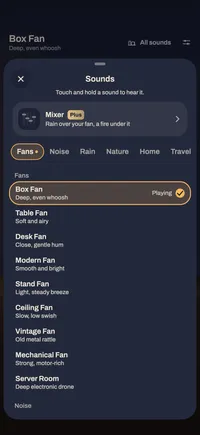
Pick a fan
Nine fans, from a box fan’s deep, even whoosh to the drone of a server room. Each plays at low, medium or high speed.
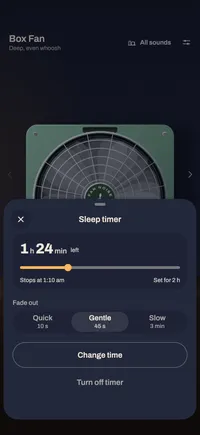
Set the sleep timer
From 15 minutes to 8 hours, all night or a time of your own, with a gentle, quick or slow fade-out.
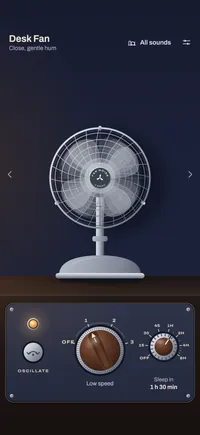
Lock your phone
The fan plays on with the screen off, its controls on your lock screen, and eases away when the timer ends.


Screens from the app on iPhone, in The Fan look.
Nine fans · seamless loops
No gap. No click. Just sleep.
Every fan loops without a seam, so there’s no skip or click to wake you at 3 a.m. Each plays at low, medium or high speed.
Fans
Box Fan
Deep, even whoosh
Table Fan
Soft and airy
Desk Fan
Close, gentle hum
Modern Fan
Smooth and bright
Stand Fan
Light, steady breeze
Ceiling Fan
Slow, low swish
Vintage Fan
Old metal rattle
Mechanical Fan
Strong, motor-rich
Server Room
Deep electronic drone
Noise, free and built in
White noise
Bright and even
Brown noise
Deeper and softer
Three looks for your nightstand.
Every sound plays the same in each look; only the picture changes. Switch any time in Settings › Look. All three are free.
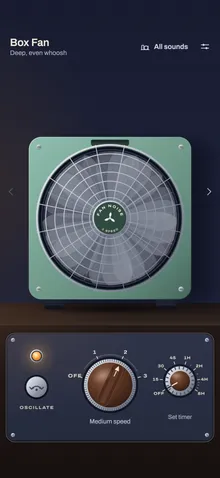
The Fan
A 1970s fan on a walnut nightstand, with a speed knob, a pilot light and a timer dial.
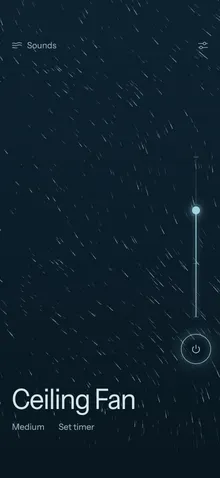
Airflow
The sound as slow moving air, with a speed rail and a power ring that fade back while it plays.
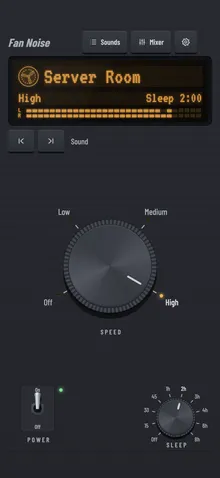
Bedside Hi-Fi
An amber display, chunky SPEED and SLEEP knobs and a POWER lever, in brushed graphite.


The Fan on iPad
On a tablet, each look is laid out for the bigger screen. The Fan spreads out, with a volume slider on its plate and your fans in a row along the bottom.

PlusFan Noise Plus
Sleep to rain, waves or the dryer.
Fan Noise Plus adds 46 more sleep sounds, the mixer, saved mixes and no ads. Plus sounds download the first time they play, then play offline.


Every sound
46 more, kept for offline nights.
Mix up to four sounds
One main sound and up to three more layered under it, each at its own level.
Save your mixes
Name the ones you love, or start from five ready-made ones such as Fan and rain or Night train.
No ads
Nothing between you and your fan.
Among the 46
- Rain
- Light and heavy rain, rain on a window, on a tent and on a tin roof, and a thunderstorm
- Nature
- Ocean waves, a gentle stream, a forest at night, a lake shore, wind, frogs and a campfire
- Around the house
- Clothes dryer, washing machine, hair dryer, air conditioner, fridge hum, dishwasher, vacuum cleaner, radiator and an aquarium
- On the move
- An airplane cabin, a train, a car on the highway, a spaceship and a distant city
- Noise
- Pink and grey noise
- For babies
- A womb and gentle shushing
Free, with ads: the nine fans, white and brown noise, the sleep timer, night mode and all three looks.
Yearly, monthly, or once for life. The app shows the price in your country before you buy.
More than a fan.
The parts that make a whole night easier, all in the free app.
Plays with the screen off
Lock your phone and the fan keeps going, with its controls on the lock screen. Calls and headphones are handled for you.
Night mode
While a sound plays, the screen dims to soft moving air after 20 seconds without a touch. Tap to wake it.
White and brown noise
Both free and built in, for tuning out snoring, traffic, neighbors or a busy house.
No account needed
Start straight away. Saving an account is optional, and only carries Plus and your settings to a new phone.
Plays offline
The fans and the noise are in the app, so they play on a plane, in a cabin or anywhere without a signal.
iPhone, iPad and Android
On your phone or your tablet, each look laid out for the screen it’s on.
Questions, answered.
Something else? Write to support@fannoise.app. A real person reads every note.
- What is Fan Noise?
- An app that plays the steady hum of a fan all night: nine fans that loop without a gap, white and brown noise, and a sleep timer that fades the sound out once you’re asleep. On iPhone, iPad and Android.
- Is Fan Noise free?
- Yes. The nine fans, white and brown noise, the sleep timer, night mode and all three looks are free, with ads. Fan Noise Plus adds 46 more sleep sounds, the mixer, saved mixes and no ads.
- Will I hear where the sound repeats?
- No. Every fan loops without a gap or a click, so there’s no seam to wake you.
- Does it keep playing with the screen off?
- Yes. Lock your device and the fan plays on. Its controls are on your lock screen and, on Android, in its notification.
- How does the sleep timer work?
- Choose 15 minutes to 8 hours, all night or a time of your own, and a gentle, quick or slow fade-out. When the time is up, the sound eases away instead of stopping.
- Do I need an account?
- No. Fan Noise makes one for you the first time you open it. Save it with Apple, Google or email in Settings › Save your account, and Plus and your settings follow you to a new device.

Your fan is waiting on the nightstand.
Free on iPhone, iPad and Android. No account needed.